> ## Documentation Index
> Fetch the complete documentation index at: https://docs.dune.com/llms.txt
> Use this file to discover all available pages before exploring further.
# Dune MCP
> Connect AI agents to Dune's official MCP server for onchain analytics workflows.
MCP (Model Context Protocol) is an open standard for connecting AI applications to external systems.
Dune MCP is Dune's official remote MCP server. It gives your agent direct, structured access to Dune workflows: discover relevant datasets, create and run SQL queries, inspect execution results, manage visualizations, and build dashboards — all in the same conversation.
This is the fastest way to move from prompt to reliable onchain analysis.
## Setup and Usage
## Authentication
Dune MCP supports two authentication modes today:
1. **OAuth 2.0 (recommended for Browser agents or agents with access to the browser)**
2. **Dune API key (recommended for environments with no access to a browser)**
### OAuth
Typically when setting up OAuth the agent just needs:
* `Name`: Dune
* `url`: `https://api.dune.com/mcp/v1`
When you add these details you will likely see your browser open up on the Dune Login page where upon successful login you will be taken back your Agent where you should be logged in and ready to go.
### Api Key
You can authenticate with the MCP using your [Dune Api Key](/api-reference/overview/authentication)
* Header auth: `x-dune-api-key: `
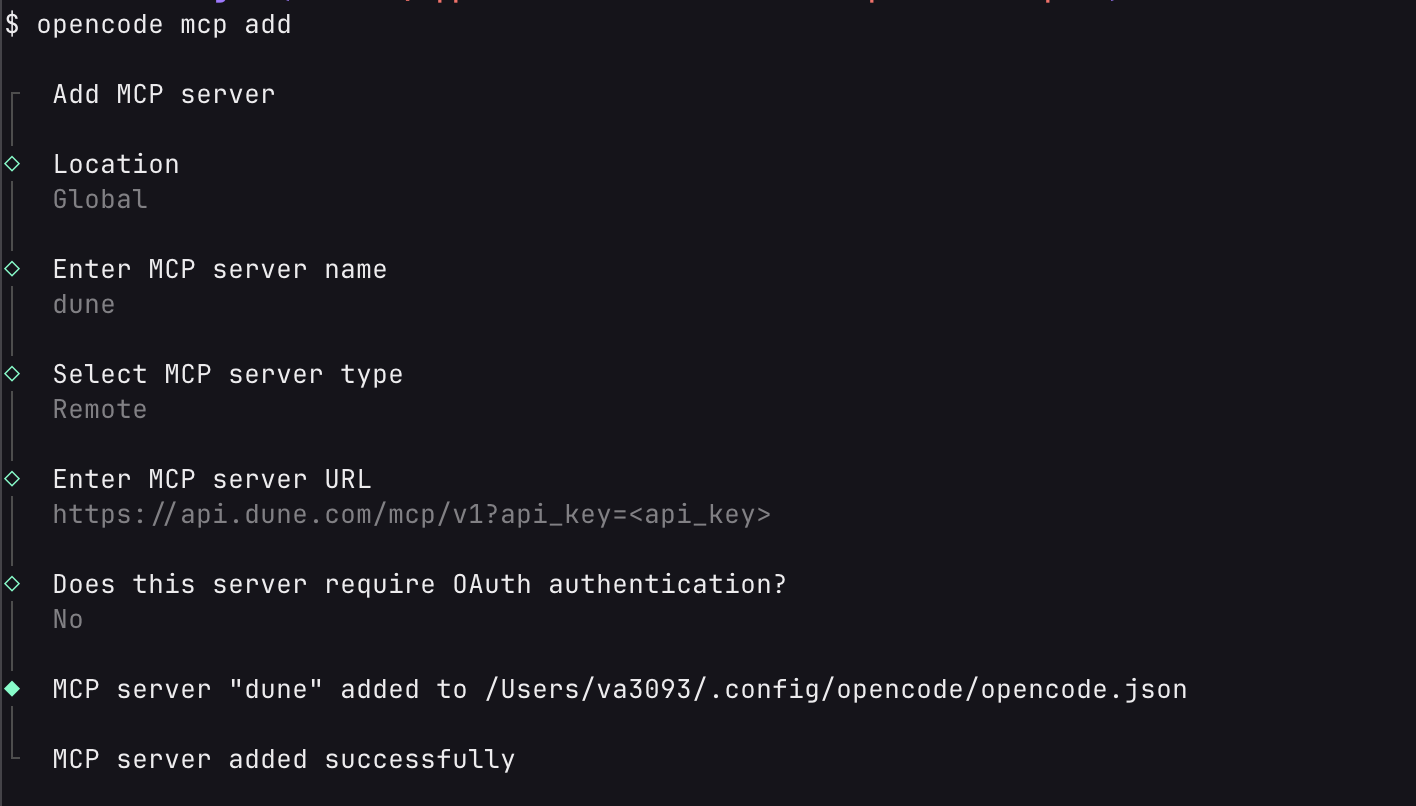
* Query auth (for clients that prefer URL auth): `?api_key=`
Generally using the Header is preferred but some agents do now allow you to configure the Headers sent with MCP calls. In those cases you can pass the api key in the url query parameters.
## Setup exampls
### Claude Code
#### Oauth
```
claude mcp add --scope user --transport http dune https://api.dune.com/mcp/v1
```
#### API Key
```bash theme={null}
claude mcp add --scope user --transport http dune https://api.dune.com/mcp/v1 --header "x-dune-api-key: "
```
### Claude Desktop
### OpenCode
#### Oauth
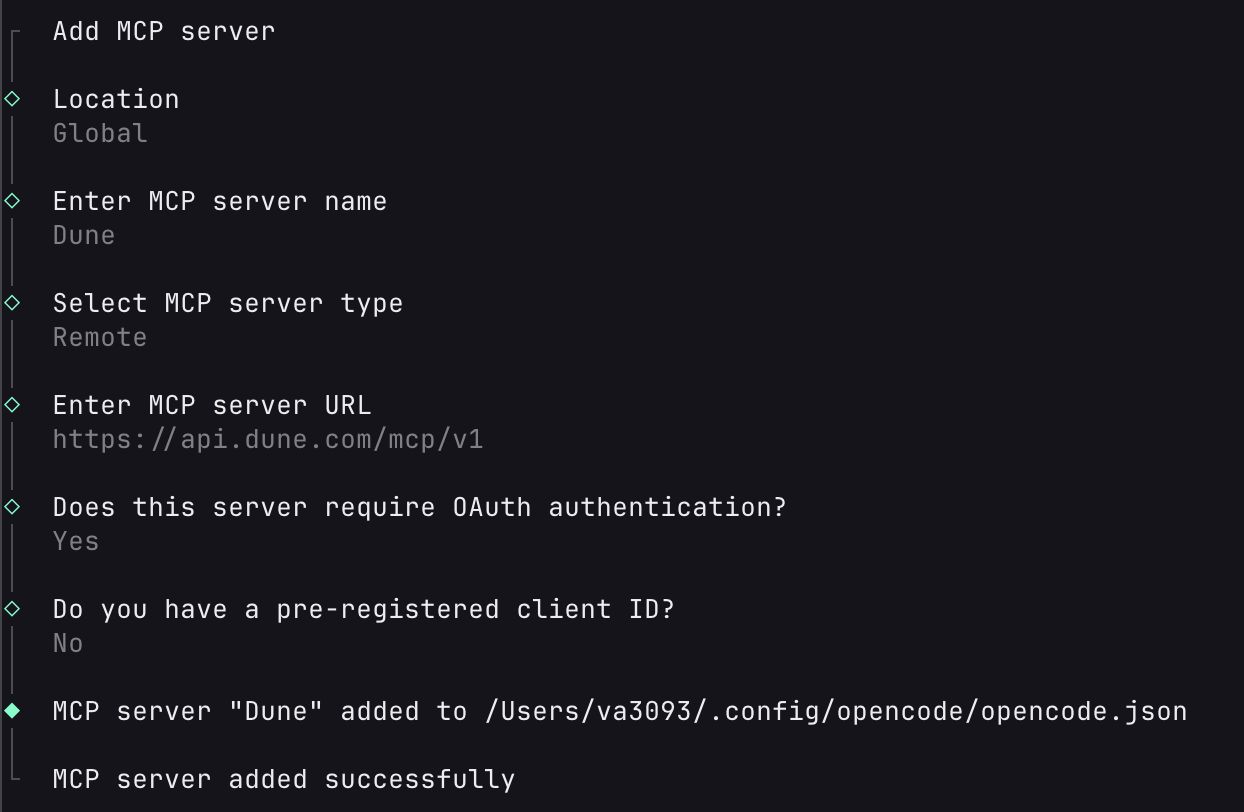 Once added run `opencode mcp auth Dune` and it will open up a browser where you can log into Dune.
#### API Key
Once added run `opencode mcp auth Dune` and it will open up a browser where you can log into Dune.
#### API Key
 ### Codex
#### Oauth
```bash theme={null}
codex mcp add dune --url "https://api.dune.com/mcp/v1"
# Login after adding the MCP
codex mcp login dune
```
#### API Key
```bash theme={null}
codex mcp add dune_prod --url "https://api.dune.com/mcp/v1?api_key="
```
**Known issue: "Transport closed" errors during long-running queries**
Codex's MCP client has a default tool timeout of 60 seconds. When `getExecutionResults` polls for a query that takes longer than this, Codex terminates the connection. Due to a [known Codex bug](https://github.com/openai/codex/issues/11489), the MCP transport does not auto-reconnect after a timeout - all subsequent tool calls will fail with `Transport closed` until you start a new session.
**Workaround:** Increase the Codex tool timeout in your config:
```toml theme={null}
[mcp_servers.dune]
url = "https://api.dune.com/mcp/v1"
tool_timeout_sec = 300
```
### Cursor
### Codex
#### Oauth
```bash theme={null}
codex mcp add dune --url "https://api.dune.com/mcp/v1"
# Login after adding the MCP
codex mcp login dune
```
#### API Key
```bash theme={null}
codex mcp add dune_prod --url "https://api.dune.com/mcp/v1?api_key="
```
**Known issue: "Transport closed" errors during long-running queries**
Codex's MCP client has a default tool timeout of 60 seconds. When `getExecutionResults` polls for a query that takes longer than this, Codex terminates the connection. Due to a [known Codex bug](https://github.com/openai/codex/issues/11489), the MCP transport does not auto-reconnect after a timeout - all subsequent tool calls will fail with `Transport closed` until you start a new session.
**Workaround:** Increase the Codex tool timeout in your config:
```toml theme={null}
[mcp_servers.dune]
url = "https://api.dune.com/mcp/v1"
tool_timeout_sec = 300
```
### Cursor
tl:dr; Add this configuration to your Cursor settings:
**Oauth**
```json theme={null}
{
"mcpServers": {
"dune": {
"url": "https://api.dune.com/mcp/v1",
}
}
}
```
**Api Key**
```json theme={null}
{
"mcpServers": {
"dune": {
"url": "https://api.dune.com/mcp/v1",
"headers": {
"X-DUNE-API-KEY": ""
}
}
}
}
```
## Tools and Resources Inventory
### Tools
| Category | Tool | Description |
| ---------------------- | ------------------------------- | ---------------------------------------------------------------------------------------------- |
| **Discovery** | `searchDocs` | Search Dune docs for guides, examples, and API references |
| **Discovery** | `searchTables` | Find tables by protocol, chain, category, or schema |
| **Discovery** | `listBlockchains` | List indexed blockchains with table counts |
| **Discovery** | `searchTablesByContractAddress` | Find decoded event/call tables for a contract address |
| **Discovery** | `getTableSize` | Estimate the data scanned by a query for one or more tables |
| **Query Lifecycle** | `createDuneQuery` | Create and save a new Dune query |
| **Query Lifecycle** | `getDuneQuery` | Fetch SQL and metadata for an existing query |
| **Query Lifecycle** | `updateDuneQuery` | Update SQL, title, description, tags, or parameters |
| **Query Lifecycle** | `executeQueryById` | Execute a saved query and return an execution ID |
| **Query Lifecycle** | `getExecutionResults` | Fetch status and results for a query execution |
| **Materialized Views** | `createMaterializedView` | Materialize a saved query's results into a queryable table, with an optional scheduled refresh |
| **Materialized Views** | `listMaterializedViews` | List materialized views owned by you or your team |
| **Materialized Views** | `getMaterializedView` | Fetch a materialized view's metadata, size, and execution status |
| **Materialized Views** | `refreshMaterializedView` | Re-run the source query on demand to update the materialized table |
| **Materialized Views** | `updateMaterializedView` | Change the performance tier or add/change/remove the refresh schedule |
| **Materialized Views** | `deleteMaterializedView` | Permanently delete a materialized view |
| **Visualization** | `generateVisualization` | Create charts, counters, and tables from query results |
| **Visualization** | `getVisualization` | Fetch details of an existing visualization |
| **Visualization** | `updateVisualization` | Update an existing visualization's configuration |
| **Visualization** | `deleteVisualization` | Delete a visualization |
| **Visualization** | `listQueryVisualizations` | List all visualizations attached to a query |
| **Dashboard** | `createDashboard` | Create a new dashboard with widgets and layout |
| **Dashboard** | `getDashboard` | Fetch details of an existing dashboard |
| **Dashboard** | `updateDashboard` | Update a dashboard's content, layout, or metadata |
| **Dashboard** | `archiveDashboard` | Archive a dashboard |
| **Account** | `getUsage` | Check current billing-period credit usage |
### Resources
| Resource | Description |
| ---------------------------------------- | ----------------------------------------------- |
| `query-engine-writing-efficient-queries` | Performance and cost best practices for DuneSQL |
| `query-engine-functions-and-operators` | DuneSQL function/operator reference |
## Server Details
* **Server name:** `dune`
* **Remote MCP URL:** `https://api.dune.com/mcp/v1`
* **Tagline:** Query, analyze, and visualize onchain data from Dune directly inside your MCP-compatible AI client.
* **Primary use cases:**
* Discover datasets and docs relevant to a protocol, contract, or chain
* Create, update, execute, and troubleshoot Dune SQL queries
* Turn query results into charts/tables/counters without leaving your chat
* Create and manage full dashboards from natural language prompts
* Materialize query results into reusable tables and keep them fresh on a schedule
* Track account credit usage while iterating on analysis
## Prompt Examples
Try prompts like these in your MCP-enabled client:
1. "Find the best Dune table for tracking Uniswap v3 swap volume on Ethereum, then create and run a daily volume query for the last 90 days."
2. "I have contract `0xa0b86991c6218b36c1d19d4a2e9eb0ce3606eb48`. Find decoded tables, build a weekly transfer count query, execute it, and show the top 20 recipient wallets."
3. "Review query `1234567`, optimize it for lower scan cost, update it in place, run it, and summarize result quality and execution credits used."
4. "Generate a visualization from my latest execution results: a line chart of daily active addresses and a counter for total unique users."
5. "Create a dashboard showing Ethereum activity in the past 30 days — include daily transactions, active addresses, and gas usage."
6. "Update my existing dashboard to add a new chart showing weekly DEX volume by protocol."
7. "Materialize my daily active addresses query into a table and refresh it every hour, then list my materialized views to confirm."
## Connection Details
### Transport
* Protocol: **Remote MCP over Streamable HTTP**
* Endpoint: `https://api.dune.com/mcp/v1`
* Interaction pattern:
* `POST /mcp/v1` for MCP requests
* `GET /mcp/v1` for stream resumption/event replay
#### OAuth 2.0 details
* Authorization server issuer: `https://dune.com/oauth/mcp`
* Discovery metadata: `https://dune.com/.well-known/oauth-authorization-server/oauth/mcp`
* Authorization endpoint: `https://dune.com/oauth/mcp/authorize`
* Token endpoint: `https://dune.com/oauth/mcp/token`
* Dynamic client registration endpoint: `https://dune.com/oauth/mcp/register`
* JWKS endpoint: `https://dune.com/oauth/mcp/jwks.json`
* Grant types: `authorization_code`, `refresh_token`
* Client auth at token endpoint: `none` (public clients)
* PKCE: required (`S256`)
* Scope: `mcp:dune:full`
* Resource parameter for authorization requests: `https://api.dune.com`
## Troubleshooting
* **OAuth `invalid_request` on authorize:** Verify required params (`client_id`, `redirect_uri`, `state`, `code_challenge`, `code_challenge_method=S256`, `resource=https://api.dune.com`).
* **OAuth `unsupported_grant_type` on token:** Use only `authorization_code` or `refresh_token`.
* **OAuth `invalid_grant` on token exchange:** Ensure your `code_verifier` matches the original PKCE challenge and `redirect_uri` exactly matches the authorize request.
* **`Unauthorized` from MCP endpoint:** Confirm valid auth (OAuth bearer token or Dune API key).
* **Codex `Transport closed` during long polls:** Increase MCP tool timeout (for example `tool_timeout_sec = 300`) and restart the session if the transport already closed.
## Related Resources
Agent Skills for Dune -- portable instruction packages that teach AI agents how to work with blockchain data using the Dune CLI.
Learn how to use the Dune CLI and Agent Skills as an alternative to MCP for terminal-native AI workflows.
## Privacy and Support
* Privacy policy: [https://dune.com/privacy](https://dune.com/privacy)
* Support: [support@dune.com](mailto:support@dune.com)