> ## Documentation Index
> Fetch the complete documentation index at: https://docs.dune.com/llms.txt
> Use this file to discover all available pages before exploring further.
# Ethereum Decoded Overview
> Simplifying Ethereum smart contract analysis through human-readable tables.
export const DuneEmbed = ({qID, vID, height = '500px'}) => <>
;
### Overview of Dune's Decoded Data Approach
Dune uses the ABI (Application Binary Interface) of smart contracts to decode blockchain transactions into structured tables. Each event log and function call from the ABI are parsed into their own tables. This decoding process transforms the raw, encoded data on the blockchain into human-readable tables, simplifying the analysis of smart contract data.
Dune's decoded data approach offers several benefits:
* **Enhanced Readability:** The decoded data tables provide a clear and intuitive representation of smart contract activities
* **Efficient Analysis:** The structured tables enable efficient querying and analysis of smart contract data
* **Handling Multiple Contract Instances:** For smart contracts with multiple instances, Dune aggregates the data from these instances into a single table, simplifying the analysis process.
* **Collaborative Mapping:** Dune's smart contract library is continuously expanded through the active participation of the Dune community, ensuring that the decoding coverage remains comprehensive and current.
## Which contracts have decoded data?
Contract submissions on Dune are driven by the community. Usually the odds are good that the contract you are looking at is already decoded, but especially for new projects or new contracts, it might be that the contract is not decoded yet. In those cases you can submit the contract to be decoded. Decoding usually takes about 24 hours, in special cases it might take longer.
You can check if contracts are already decoded by querying [`[blockchain].contracts`](/data-catalog/evm/ethereum/decoded/contracts) tables, the [data explorer](/web-app/query-editor/data-explorer) or use [this dashboard](https://dune.com/dune/is-my-contract-decoded-yet-v2).
## How does decoding work?
Smart Contracts on any EVM blockchain are mostly written in high level languages like [Solidity](https://docs.soliditylang.org/en/v0.8.2) or [Vyper](https://vyper.readthedocs.io/en/stable).
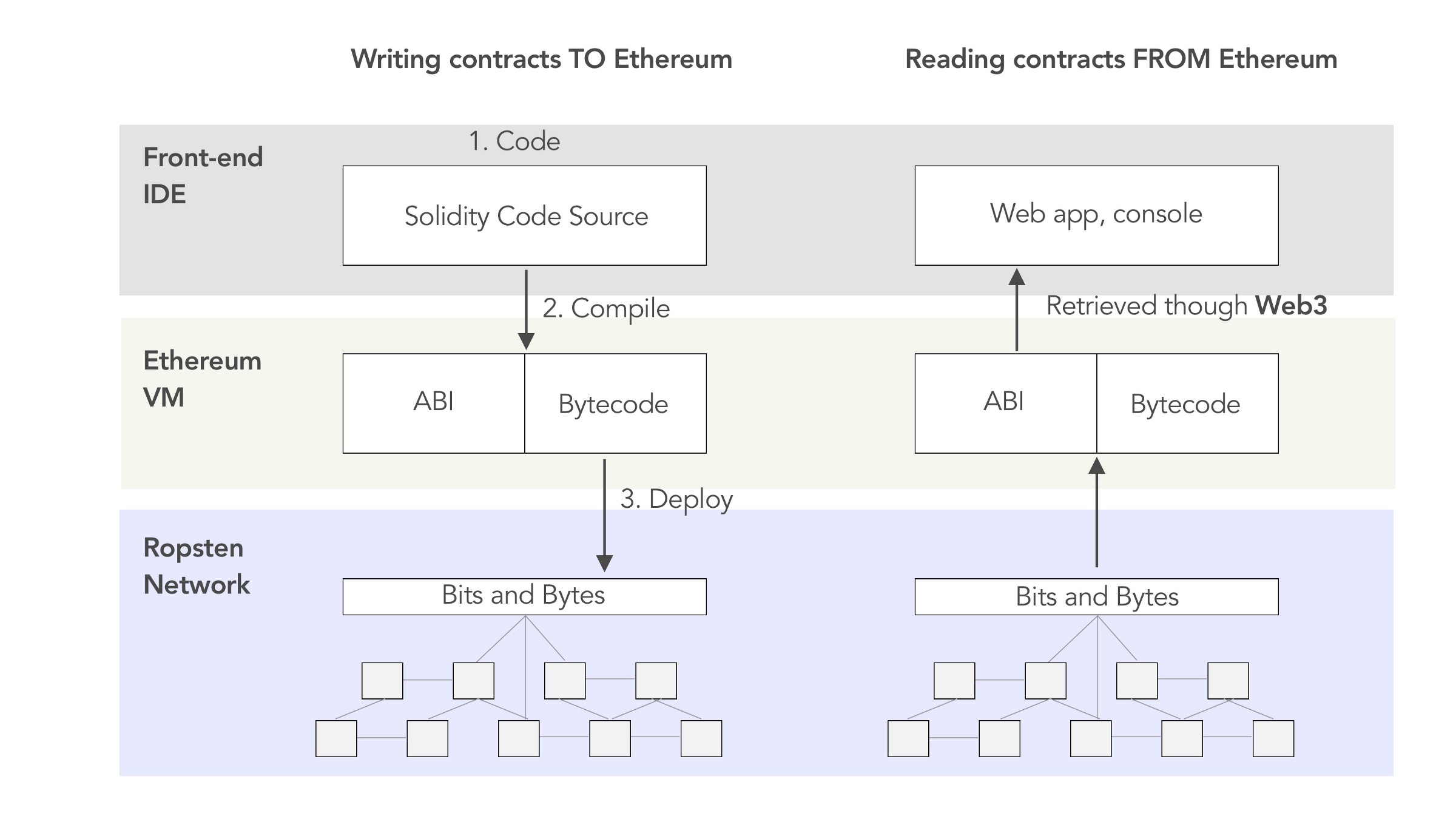
In order for them to be able to be deployed to an EVM execution environment, they need to be compiled to EVM executable bytecode. Once deployed, the bytecode gets associated to an address on the respective chain and is permanently stored in this chain's state storage.
To be able to interact with this smart contract, which is now just bytecode, we need a guide to be able to call the functions which are defined in the high-level languages. This translation of names and arguments into byte representation is done using an **Application Binary Interface (ABI)**.
The ABI documents names, types, and arguments precisely which allows us to interact with the smart contract using a somewhat human readable format. The ABI can be compiled using the high level language source code.
**The ABI is used to call a smart contract or interpret the data it emits.**
 ## Decoding Example
We are going to look at an event log of an ERC20 transfer event from the [smart contract](https://etherscan.io/token/0x429881672B9AE42b8EbA0E26cD9C73711b891Ca5#readContract) that represents the \$PICKLE token.
On [Etherscan](https://etherscan.io/tx/0x2bb7c8283b782355875fa37d05e4bd962519ea294678a3dcf2fdffbbd0761bc5#eventlog) the undecoded event looks like this:
## Decoding Example
We are going to look at an event log of an ERC20 transfer event from the [smart contract](https://etherscan.io/token/0x429881672B9AE42b8EbA0E26cD9C73711b891Ca5#readContract) that represents the \$PICKLE token.
On [Etherscan](https://etherscan.io/tx/0x2bb7c8283b782355875fa37d05e4bd962519ea294678a3dcf2fdffbbd0761bc5#eventlog) the undecoded event looks like this:
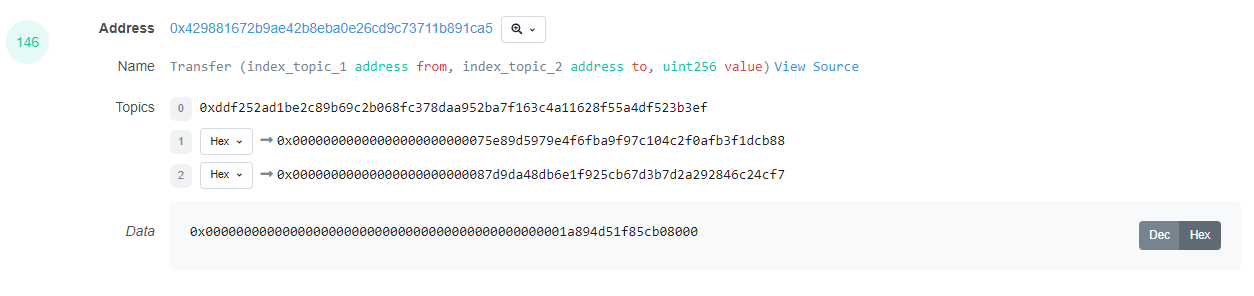 If we query for this transaction in the `ethereum.logs` table in the Dune database, we will receive the same encoded bytecode as our result dataset.
```sql theme={null}
SELECT *
FROM ethereum.logs
WHERE tx_hash = 0x2bb7c8283b782355875fa37d05e4bd962519ea294678a3dcf2fdffbbd0761bc5
```
If we query for this transaction in the `ethereum.logs` table in the Dune database, we will receive the same encoded bytecode as our result dataset.
```sql theme={null}
SELECT *
FROM ethereum.logs
WHERE tx_hash = 0x2bb7c8283b782355875fa37d05e4bd962519ea294678a3dcf2fdffbbd0761bc5
```
We could make short work of this encoded bytecode by using [DuneSQL Varbinary functions](/query-engine/Functions-and-operators/varbinary) to decode it, but having the contract's ABI at hand makes this process much easier. This contract is decoded in Dune, so we can use the `pickle_finance_ethereum.PickleToken_evt_Transfer` table to access the decoded event log.
```sql theme={null}
SELECT *
FROM pickle_finance_ethereum.PickleToken_evt_Transfer
WHERE evt_tx_hash = 0x2bb7c8283b782355875fa37d05e4bd962519ea294678a3dcf2fdffbbd0761bc5
```
**Now this is actually useful for analyzing this transaction!**
How exactly does this work?
Since we know which event we are looking at here, we can simply convert the encoded bytecode to decoded data by decoding the bytecode according to its datatype.
The structure for the `Transfer` event log of an ERC20 token will always be:
```solidity theme={null}
Transfer(address from, address to, uint256 value)
```
This basically tells us that topic2 and topic3 are of the type `address`(32bytes) and are respectively the sender and recipient of the token transfer. An event log only has 3 indexed fields, so the `data` field is used to store the information about how much units of the token have been moved in this transaction. This field is called `value`.
Since `topic0` always is just the Keccak-256 hash of the signature of the event, we are left with decoding `topic1`, `topic2` and `data`.
In this case, they map out like this:
| raw data field | decoded data description | raw data | decoded data |
| -------------- | -------------------------------------------- | ------------------------------------------------------------------ | ----------------------------------------------------------------------------- |
| topic0 | keccak('Transfer(address,address,uint256'')) | 0xddf252ad1be2c89b69c2b068fc378daa952ba7f163c4a11628f55a4df523b3ef | not needed, this table only contains event logs from the `transfer` event log |
| topic1 | from | 0x00000000000000000000000075e89d5979e4f6fba9f97c104c2f0afb3f1dcb88 | 0x75e89d5979e4f6fba9f97c104c2f0afb3f1dcb88 |
| topic2 | to | 0x00000000000000000000000087d9da48db6e1f925cb67d3b7d2a292846c24cf7 | 0x87d9da48db6e1f925cb67d3b7d2a292846c24cf7 |
| data | value | 0x00000000000000000000000000000000000000000000001a894d51f85cb08000 | 489509000000000000000 |
Now what works for a single erc20 token, works for all erc20 tokens. We can use defined interfaces to decode the data of any erc20 token transfer event log.
## How do I understand decoded data?
Decoded data is the high level programming language representation of two pieces of software talking to each other via the blockchain.
It's not always easy for a human to understand what exactly is going on in these interactions, but most of the time, looking at column names and the data that is transmitted within them should help you to understand what is happening within that specific log or call.
If you are not able to make sense of the data by just searching the tables, it usually helps to look at single transactions using the transaction hash and Etherscan.
Furthermore, actually going into the smart contract's code (our favorite way to do this is [DethCode](https://etherscan.deth.net)) to read the comments or the actual logic can help to understand the smart contract's emitted data.
If that also doesn't lead to satisfactory results, scouring the relevant docs and GitHub of the project can lead you to the desired answers. Furthermore, talking to the developers and core community of a project can also help you to get an understanding of the smart contracts.