> ## Documentation Index
> Fetch the complete documentation index at: https://docs.dune.com/llms.txt
> Use this file to discover all available pages before exploring further.
# Datashare Overview
> Access all of Dune's blockchain data directly in your data warehouse for privacy and control.
Datashare brings our complete blockchain dataset (1.5M+ tables, 100+ chains) directly into your data warehouse. Query blockchain data in your own environment with complete privacy and control.
## How Datashare Works
Datashare replicates Dune's processed blockchain data directly into your cloud data warehouse:
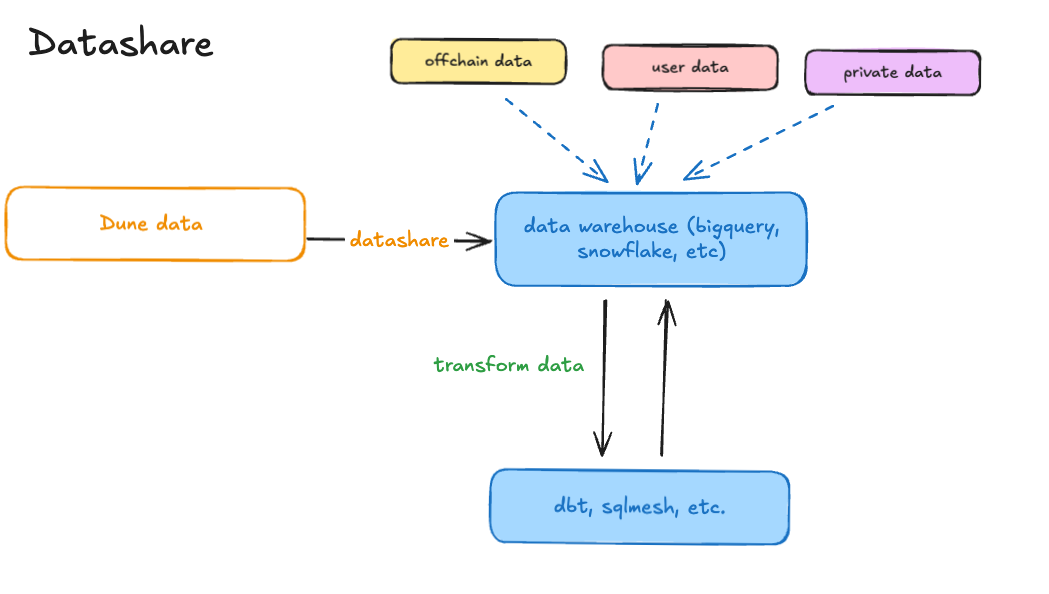 1. **Data Replication**: We maintain live copies of all Dune tables in your Snowflake or BigQuery environment
2. **Native Integration**: Data appears as regular tables/datasets in your warehouse - no APIs or external connections
3. **Fresh Data**: Automatic updates keep your data in sync with Dune's platform (hourly/daily refresh)
4. **Your Environment**: Query using your warehouse's native SQL, compute, and security controls
This is the same curated, decoded blockchain data that powers dune.com - optimized for analytics with proper data types and indexing.
## Platforms
| **Platform** | **Access Method** | **Trial Available** |
| ---------------------------------------------------- | ----------------------------------------------------- | ------------------- |
| ❄️ **[Snowflake](/datashare/datashare-snowflake)** | Marketplace or Direct Share | 30-day free trial |
| 🔍 **[BigQuery](/datashare/datashare-bigquery)** | Dataset Sharing | Contact for trial |
| 🧱 **[Databricks](/datashare/datashare-databricks)** | Cross-Region Replication | Contact for trial |
| 🪣 **[S3 Export](/datashare/datashare-s3)** | Iceberg tables in a Dune-managed S3 bucket (dbt only) | Contact for setup |
## Why Choose Datashare
* **Complete Privacy**: Query in your warehouse - Dune never sees your queries or results
* **Join Your Data**: Seamlessly combine blockchain data with your internal datasets
* **Cost Control**: Use your existing warehouse compute and manage costs directly
* **No Rate Limits**: Query as much as you need without API constraints
* **Enterprise Security**: Leverage your warehouse's existing security and compliance controls
* **dbt Integration**: Publish dbt-managed transformation outputs from Dune directly into your warehouse with [dbt to Datashare](/api-reference/connectors/dbt/datashares)
## Working with Dune
### Getting Started
**For Trials:**
* **Snowflake**: Self-service via [Snowflake Marketplace](https://app.snowflake.com/marketplace/providers/GZSVZMYSCO/Dune)
* **BigQuery**: Email [datashares-sales@dune.com](mailto:datashares-sales@dune.com) with your requirements
**For Production:** Contact our enterprise team at [dune.com/enterprise](https://dune.com/enterprise) or [datashares-sales@dune.com](mailto:datashares-sales@dune.com)
### What We Need From You
To set up datashare access, we need specific identifiers from your cloud environment:
Please provide your Snowflake data sharing account identifier so I can grant you access to a listing. To find this identifier log in to your Snowflake account and click at your user profile at the bottom of the screen > *Account* > *View account details* > Copy data sharing account identifier (you can view a visual path [here](https://docs.snowflake.com/en/alias/client/account-identifier-listing)). You can also run the following SQL command:
```sql theme={null}
SELECT CURRENT_ORGANIZATION_NAME() || '.' || CURRENT_ACCOUNT_NAME();
```
Then, share your identifier with me.
**Required Information:**
* **GCP Project ID** (not project name - the unique ID)
* **Principal for access** (user email, service account, or domain)
* **Preferred region** (US Central 1 or EU West 2)
* **Chains of interest** (optional - we can share all by default)
**Principal Examples:**
* User: `user:alice@company.com`
* Service Account: `serviceAccount:etl-service@my-project.iam.gserviceaccount.com`
* Domain: `domain:company.com` (all users in domain)
S3 Export is available only through [dbt to Datashare](/api-reference/connectors/dbt/datashares). You publish your own dbt-managed tables to a Dune-managed S3 bucket. There is no managed replication of Dune's full dataset to S3.
**Required Information:**
* **Preferred AWS region**: where the export bucket is created
* **Read access principal**: either an IAM role ARN in your AWS account, or your AWS account ID
Dune provisions the bucket and grants your principal read access; you query the Iceberg tables directly from S3 with your own engine. See the [S3 Export guide](/datashare/datashare-s3) for details.
### Setup Process
1. **Share Identifiers**: Provide the required identifiers for your platform
2. **Access Configuration**: We configure sharing permissions on our side
3. **Verification**: We'll confirm when data is available in your environment
4. **Support**: Ongoing technical support for queries and optimization
**Security Note**: We only need identifiers to grant access - never passwords, keys, or other sensitive credentials.
## Platform-Specific Access
Marketplace access, data types, and query examples
Dataset sharing, principals, and optimization tips
Iceberg tables in a Dune-managed bucket, access, and Requester Pays
Sync dbt-managed tables from your Dune namespace into your warehouse
## Next Steps
1. **[Try a free trial](/datashare/datashare-trial)** - Test our data on your platform
2. **[Review platform guides](/datashare/datashare-snowflake)** - Learn about data types and querying
3. **[Contact enterprise team](https://dune.com/enterprise)** - Discuss production requirements
4. **[Check FAQs](/datashare/datashare-faqs)** - Common questions and troubleshooting
Need a different platform or have questions? [Contact us](https://dune.com/enterprise) or email [support@dune.com](mailto:support@dune.com).
1. **Data Replication**: We maintain live copies of all Dune tables in your Snowflake or BigQuery environment
2. **Native Integration**: Data appears as regular tables/datasets in your warehouse - no APIs or external connections
3. **Fresh Data**: Automatic updates keep your data in sync with Dune's platform (hourly/daily refresh)
4. **Your Environment**: Query using your warehouse's native SQL, compute, and security controls
This is the same curated, decoded blockchain data that powers dune.com - optimized for analytics with proper data types and indexing.
## Platforms
| **Platform** | **Access Method** | **Trial Available** |
| ---------------------------------------------------- | ----------------------------------------------------- | ------------------- |
| ❄️ **[Snowflake](/datashare/datashare-snowflake)** | Marketplace or Direct Share | 30-day free trial |
| 🔍 **[BigQuery](/datashare/datashare-bigquery)** | Dataset Sharing | Contact for trial |
| 🧱 **[Databricks](/datashare/datashare-databricks)** | Cross-Region Replication | Contact for trial |
| 🪣 **[S3 Export](/datashare/datashare-s3)** | Iceberg tables in a Dune-managed S3 bucket (dbt only) | Contact for setup |
## Why Choose Datashare
* **Complete Privacy**: Query in your warehouse - Dune never sees your queries or results
* **Join Your Data**: Seamlessly combine blockchain data with your internal datasets
* **Cost Control**: Use your existing warehouse compute and manage costs directly
* **No Rate Limits**: Query as much as you need without API constraints
* **Enterprise Security**: Leverage your warehouse's existing security and compliance controls
* **dbt Integration**: Publish dbt-managed transformation outputs from Dune directly into your warehouse with [dbt to Datashare](/api-reference/connectors/dbt/datashares)
## Working with Dune
### Getting Started
**For Trials:**
* **Snowflake**: Self-service via [Snowflake Marketplace](https://app.snowflake.com/marketplace/providers/GZSVZMYSCO/Dune)
* **BigQuery**: Email [datashares-sales@dune.com](mailto:datashares-sales@dune.com) with your requirements
**For Production:** Contact our enterprise team at [dune.com/enterprise](https://dune.com/enterprise) or [datashares-sales@dune.com](mailto:datashares-sales@dune.com)
### What We Need From You
To set up datashare access, we need specific identifiers from your cloud environment:
Please provide your Snowflake data sharing account identifier so I can grant you access to a listing. To find this identifier log in to your Snowflake account and click at your user profile at the bottom of the screen > *Account* > *View account details* > Copy data sharing account identifier (you can view a visual path [here](https://docs.snowflake.com/en/alias/client/account-identifier-listing)). You can also run the following SQL command:
```sql theme={null}
SELECT CURRENT_ORGANIZATION_NAME() || '.' || CURRENT_ACCOUNT_NAME();
```
Then, share your identifier with me.
**Required Information:**
* **GCP Project ID** (not project name - the unique ID)
* **Principal for access** (user email, service account, or domain)
* **Preferred region** (US Central 1 or EU West 2)
* **Chains of interest** (optional - we can share all by default)
**Principal Examples:**
* User: `user:alice@company.com`
* Service Account: `serviceAccount:etl-service@my-project.iam.gserviceaccount.com`
* Domain: `domain:company.com` (all users in domain)
S3 Export is available only through [dbt to Datashare](/api-reference/connectors/dbt/datashares). You publish your own dbt-managed tables to a Dune-managed S3 bucket. There is no managed replication of Dune's full dataset to S3.
**Required Information:**
* **Preferred AWS region**: where the export bucket is created
* **Read access principal**: either an IAM role ARN in your AWS account, or your AWS account ID
Dune provisions the bucket and grants your principal read access; you query the Iceberg tables directly from S3 with your own engine. See the [S3 Export guide](/datashare/datashare-s3) for details.
### Setup Process
1. **Share Identifiers**: Provide the required identifiers for your platform
2. **Access Configuration**: We configure sharing permissions on our side
3. **Verification**: We'll confirm when data is available in your environment
4. **Support**: Ongoing technical support for queries and optimization
**Security Note**: We only need identifiers to grant access - never passwords, keys, or other sensitive credentials.
## Platform-Specific Access
Marketplace access, data types, and query examples
Dataset sharing, principals, and optimization tips
Iceberg tables in a Dune-managed bucket, access, and Requester Pays
Sync dbt-managed tables from your Dune namespace into your warehouse
## Next Steps
1. **[Try a free trial](/datashare/datashare-trial)** - Test our data on your platform
2. **[Review platform guides](/datashare/datashare-snowflake)** - Learn about data types and querying
3. **[Contact enterprise team](https://dune.com/enterprise)** - Discuss production requirements
4. **[Check FAQs](/datashare/datashare-faqs)** - Common questions and troubleshooting
Need a different platform or have questions? [Contact us](https://dune.com/enterprise) or email [support@dune.com](mailto:support@dune.com).