

Setup and Usage
Authentication
Dune MCP supports two authentication modes today:- OAuth 2.0 (recommended for Browser agents or agents with access to the browser)
- Dune API key (recommended for environments with no access to a browser)
OAuth
Typically when setting up OAuth the agent just needs:Name: Duneurl:https://api.dune.com/mcp/v1
Api Key
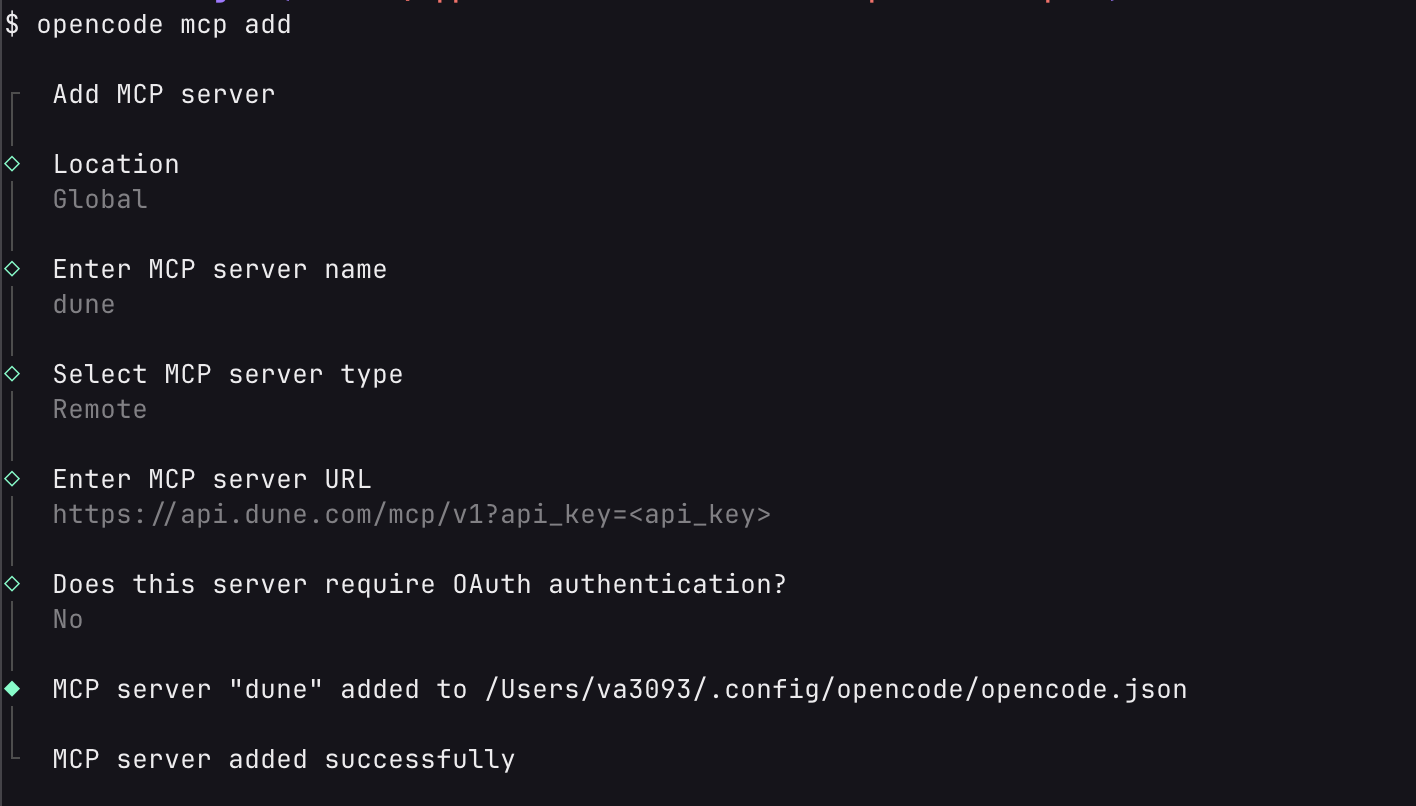
You can authenticate with the MCP using your Dune Api Key- Header auth:
x-dune-api-key: <dune-api-key> - Query auth (for clients that prefer URL auth):
?api_key=<dune_api_key>
Setup exampls
Claude Code
Oauth
API Key
Claude Desktop
OpenCode
Oauth
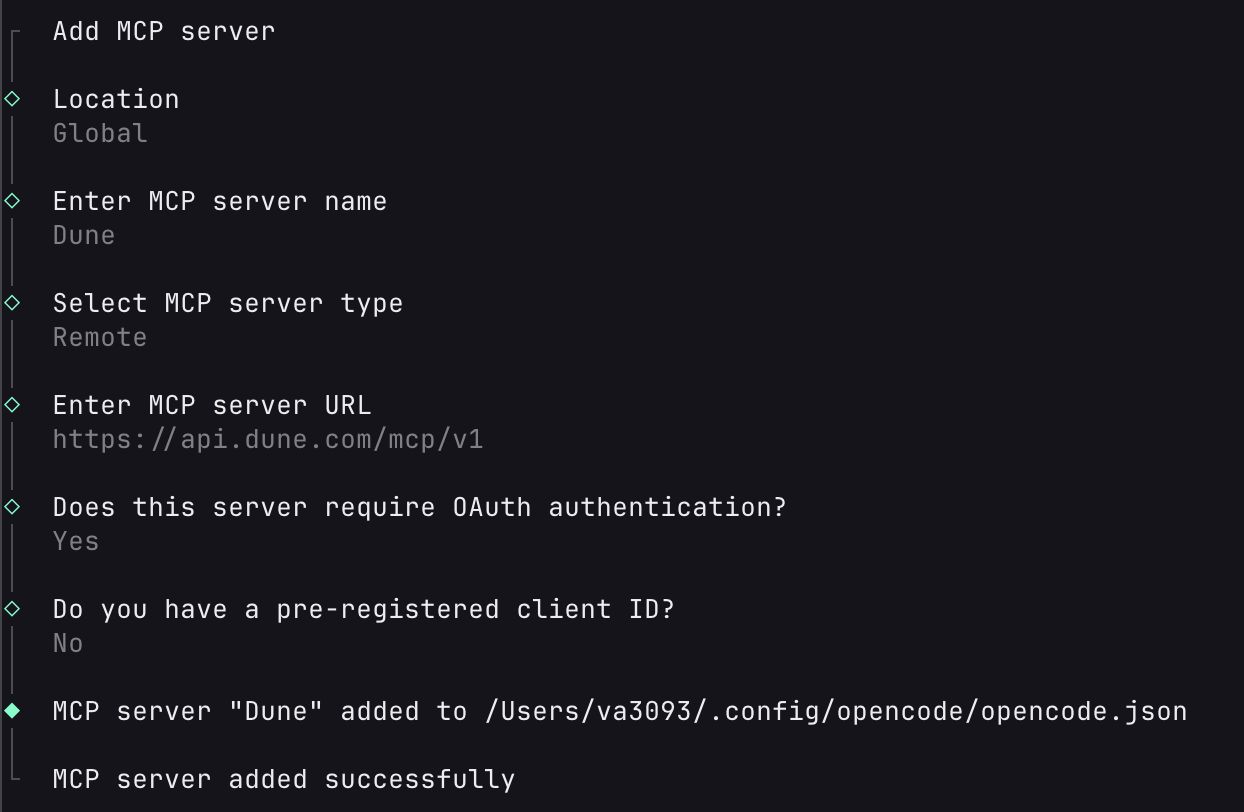
opencode mcp auth Dune and it will open up a browser where you can log into Dune.
API Key
Codex
Oauth
API Key
Cursor
Tools and Resources Inventory
Tools
Resources
Server Details
- Server name:
dune - Remote MCP URL:
https://api.dune.com/mcp/v1 - Tagline: Query, analyze, and visualize onchain data from Dune directly inside your MCP-compatible AI client.
- Primary use cases:
- Discover datasets and docs relevant to a protocol, contract, or chain
- Create, update, execute, and troubleshoot Dune SQL queries
- Turn query results into charts/tables/counters without leaving your chat
- Create and manage full dashboards from natural language prompts
- Materialize query results into reusable tables and keep them fresh on a schedule
- Track account credit usage while iterating on analysis
Prompt Examples
Try prompts like these in your MCP-enabled client:- “Find the best Dune table for tracking Uniswap v3 swap volume on Ethereum, then create and run a daily volume query for the last 90 days.”
- “I have contract
0xa0b86991c6218b36c1d19d4a2e9eb0ce3606eb48. Find decoded tables, build a weekly transfer count query, execute it, and show the top 20 recipient wallets.” - “Review query
1234567, optimize it for lower scan cost, update it in place, run it, and summarize result quality and execution credits used.” - “Generate a visualization from my latest execution results: a line chart of daily active addresses and a counter for total unique users.”
- “Create a dashboard showing Ethereum activity in the past 30 days — include daily transactions, active addresses, and gas usage.”
- “Update my existing dashboard to add a new chart showing weekly DEX volume by protocol.”
- “Materialize my daily active addresses query into a table and refresh it every hour, then list my materialized views to confirm.”
Connection Details
Transport
- Protocol: Remote MCP over Streamable HTTP
- Endpoint:
https://api.dune.com/mcp/v1 - Interaction pattern:
POST /mcp/v1for MCP requestsGET /mcp/v1for stream resumption/event replay
OAuth 2.0 details
- Authorization server issuer:
https://dune.com/oauth/mcp - Discovery metadata:
https://dune.com/.well-known/oauth-authorization-server/oauth/mcp - Authorization endpoint:
https://dune.com/oauth/mcp/authorize - Token endpoint:
https://dune.com/oauth/mcp/token - Dynamic client registration endpoint:
https://dune.com/oauth/mcp/register - JWKS endpoint:
https://dune.com/oauth/mcp/jwks.json - Grant types:
authorization_code,refresh_token - Client auth at token endpoint:
none(public clients) - PKCE: required (
S256) - Scope:
mcp:dune:full - Resource parameter for authorization requests:
https://api.dune.com
Troubleshooting
- OAuth
invalid_requeston authorize: Verify required params (client_id,redirect_uri,state,code_challenge,code_challenge_method=S256,resource=https://api.dune.com). - OAuth
unsupported_grant_typeon token: Use onlyauthorization_codeorrefresh_token. - OAuth
invalid_granton token exchange: Ensure yourcode_verifiermatches the original PKCE challenge andredirect_uriexactly matches the authorize request. Unauthorizedfrom MCP endpoint: Confirm valid auth (OAuth bearer token or Dune API key).- Codex
Transport closedduring long polls: Increase MCP tool timeout (for exampletool_timeout_sec = 300) and restart the session if the transport already closed.
Related Resources
Dune Skills Repository
Agent Skills for Dune — portable instruction packages that teach AI agents how to work with blockchain data using the Dune CLI.
Dune CLI & Skills Docs
Learn how to use the Dune CLI and Agent Skills as an alternative to MCP for terminal-native AI workflows.
Privacy and Support
- Privacy policy: https://dune.com/privacy
- Support: support@dune.com